Friday, 16 February 2018

In this article, I will explain How to Create Project in Angular 5.

Step 1: Download nodeJs from https://nodejs.org/en/ and install it.

Step 2 : After installing nodeJs .Open cmd by run as administrator and type node -v for node version check as shown below :
Step 2: Type npm -v  for npm version check as shown below :
Step 3 : Install typescript using  "npm install typescript -g”.
The “-g” command says that you can execute typescript command from any folder.Typescript is a javascript open source framework so the best way to get it installed is by using “npm”.

Step 4 : Type tsc -v for typescript version check
Step 5 : Type npm install -g @angular/cli as shown below.The Angular CLI is a command line interface tool that can create a project, add files, and perform a variety of ongoing development tasks such as testing, bundling, and deployment
Step 6 : Type ng -v for checking Angular  CLI version
Step 7 : Go to location where you want to create project .Here i have  i want to create project inside DIT folder of my E drive  so Type ng new AngularDemo(Project Name) and hit enter as shown in below :It will some time...
Step 8 : After that Type cd AngularDemo(Porject name)
as shown below :
Step 9: Type ng serve --open as shown below :
Step 10 : Output is as shown in below and this is our first angular  app

Step 11 : Press ctrl+c and type y and enter as shown below :
Step 12 : Download and install visual studio code from https://code.visualstudio.com/download for editor.We can do angular in simple notepad but here we use visual studio code which helps us with all automation for HTML, JavaScript, Typescript and so on.
Step 13 :  After installation of visual studio code .go to cmd and open as administrator and type code .(dot)  .It will open your angular project in visual code editor.
Angular project in visual studio code 
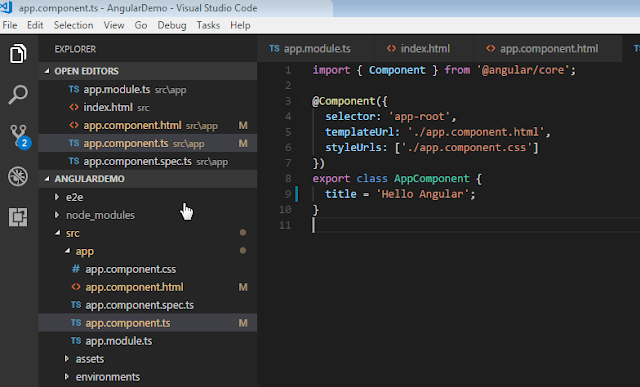
Step 13: Now go to src->app->app.component.ts and change  title to "Hello Angular". as shown below 
Step 14 : Now go to src->app->app.component.html and change <P>{{title}}</P>
as Shown below

Step 15 : Now again go to cmd and open run as administrator and type ng serve --open  again
Step 16 : Now new output is as shown below and our angular app run on 4200 port but we can change this port.

Monday, 5 February 2018

tyoeof()  
typeof is used to get the type based on a class. It takes class as parameter. If you pass object as parameter it throws an error.
object s = "Hello";

Type t = typeof(object);

Console.WriteLine(t);

Output: System.object


GetType()

GetType is used to get the type based on an object (an instance of a class).It takes object as parameter.

object s = "Hello";

Type t = typeof(object);

Console.WriteLine(t);

Output: System.object

Sunday, 4 February 2018

Here i have developed Real-time group chat application in Asp.net MVC,SignalR and JQuery.
Download Now
The following are the difference between abstract class and interface :
1)
A sub class can inherit/extends from only one abstract class i.e. multiple class inheritance is not supported in c# and java
eg:
public abstract class Animal
{
}
public abstract class Vertebrate
{
}
public class Dog : Animal,Vertebrate
{
//invalid
}
A Sub class can implement any number of interfaces i.e. multiple interface inheritance is supported in c# and java
eg:
public interface IAnimal
{
}
public interface IVertebrate
{

}
public class Dog : IAnimal,IVertebrate
{
//valid
}
2)
An abstract class can have both abstract and non abstract(concrete methods)
eg:
public abstract class Animal
{
public abstract void Breath();//valid
public void HasBackbone()//valid
{

}
}
An Interface should have only abstract  methods
eg:
public interface IAnimal
{
void Breath();//valid
void HasBackbone()//invalid
{
}
}
3)
An abstract class contains fields

eg:
public abstract class Animal
{
int i;//ok
}
An interface does not contain fields.
eg:
public interface IAnimal
{
int i;//invalid
}
4)
An abstract class can have constructor

eg:
public abstract class Animal
{
public Animal()
{
//Ok
}
}
An interface can't have constructor
eg :
public interface IAnimal
{
public IAnimal()
{
//Invalid
}
}
5)
Members of abstract can have access modifiers and default access modifiers of data member and member function/method inside an abstract class by default private and class itself has internal access modifier

eg :
abstract class Animal
{
public abstract void CanBreath();//Ok
}
Member function/method of interface cannot have access modifiers and by default all member function/method inside interface are public and interface itself has public access modifier
eg:
interface IAnimal
{
public void CanBreath();//invalid
}
6)
A sub class should not override/implement all methods inside abstract class and only override/implements abstract method

eg:
abstract class Animal
{
public abstract void CanBreath();
public  virtual void HasBackbone()
{

}
}

class Dog : Animal
{
public override void CanBreath()
{

}
}
A sub class should implement all the methods inside interfaces.
eg:
interface IAnimal
{
void CanBreath();
void HasBackbone();

}

class Dog : IAnimal
{
public void CanBreath()
{
}
public void HasBackbone()
{
}
}

Saturday, 3 February 2018

Using C# program Draw Result

 1         2

 2         3

 3         4

 4         5

Solution :

public static void SampleMethod()
        {

            for (int i = 1; i <= 4; i++)
            {
                for (int j = i; j <= i + 1; j++)
                {

                    Console.Write(j + " ");
                }
                Console.WriteLine();
            }
        }
Use the do-while loops in nested form and produces the following output in C#
 Multiple Tables

  1     2     3

  2     4     6

  3     6     9

Solution :

First Way

public static void SampleMethod()

        {

            int i = 1;

            int k = 1;

            do

            {

                int j = 1;

                do

                {

                    Console.Write(j * k + " ");

                    j++;


                } while (j <= 3);

                Console.WriteLine();

                k++;

                i++;


            } while (i <= 3);

        }
Second Way :
public static void SampleMethod()
        {
            int k = 1;
            for (int i = 1; i <= 3; i++)
            {

                for (int j = 1; j <= 3; j++)
                {

                    Console.Write(j * k + " ");
                }
                Console.WriteLine();
                k++;
            }
        }

Wednesday, 24 January 2018


C# (pronounced as "C-sharp") is a modern high-level object oriented and type safe programming language developed under the leadership of Anders Hejlsberg at Microsoft in 2002 for developing managed software applications. It is one of the most popular programming languages of .Net framework.
Platform
A platform could be hardware architecture and some software, on the top of which others applications operate. In another word, it is environment with required resources.eg. CLR (common language runtime) on which managed codes runs, JVM (Java virtual machine).
Framework
Framework is ready to use collections of classes and interfaces used for developing particular types of applications. Frameworks bring consistency in software development.eg.Net framework, spring and struts in java, Laravel and zend framework in Php.
Type safety


When data types of one type is assigned to other type unknowingly, we get the error at compile time or undesirable result at runtime and preventing such types of error is known as type safety. C# is a type safe language.
When we add integer and string value and assigned its result into integer variable throws  "cannot implicitly convert string to int" compile time error.
                       
There are two types of languages one is type safe and another is not. JavaScript is not a type safe language.
    <script>
        var number = 10;//integer
        var string = "10";//string
        var sum = string + number;//concate or addition ?
        alert(sum);//result 1010
    </script>


Monday, 22 January 2018

Introduction:


 In this article, I will explain How to implement paging using PagedList library in Asp.net MVC.

Step 1: Open visual studio Ã  Go to File menu Ã select New Ã  Project like as shown below


Step 2: Now from web templates select Asp.Net Web Application (.NET Framework) and give name (PagingInMVC) to the project and click OK button like as shown below.

Step 3: Once we click OK button new template will open in that select MVC from templates like as shown below

Step 4:Our project structure will be like as shown below

step 5: Delete the HomeController already present in the project because we will create it from scratch as shown below

Step 6: Delete the Home folder inside Views folder as shown below

Step 7 : Design database and table like shown below :


Step 8 Click on Models -> Add ->New Item as shown in below


Step 9: Select Data -> ADO.NET Entity Data Model and give name PagingModal and click add as shown below


Step 10: Select EF Designer from Database and click next as shown below


Step 11 : Enter server name (local) or your live server name and select database name and test the connection and click Ok as shown below

Step 12 : Click  Next as shown below

Step 13 : Select Next  as shown below

Step 14 : Tick check box like as shown below and click finish

Step 15 : Our models folder looks like as shown below

Step 16 :
The DummyDBEntities class is derived from DbContext class and contains DbSet<TEntity> properties of tbl_Employee type. It also overrides OnConfiguring and OnModelCreating methods. We must create an instance of DummyDBEntities to connect to the database and save or   to retrieve tbl_Employee data. 

Step 17 Our model class looks like as shown below.In database first approach this code is automatically generated by visual studio from database table.

Step 18: Connection string is auto generated in database first approach which is shown below 

Step 19 : Right click on controller folder ->Add ->Controller as shown below

Step 20 : Dialogue box will open once you click on controller and select MVC 5 controller - Empty and click Add as shown below 

Step 21 : Rename as HomeController and click Add button.Don't remove controller after Home because it is convention of MVC and MVC works on convention.

Step 22 : Now it is time to install PagedList library through Nuget package manager and for this right click on Project or Solution -> Manage Nuget Packages as shown below

Step 23 : Type PagedList in search bar and install PagedList.MVC and PagedList automatically install as shown below

Step 24 : Replace your HomeController code with following code 
 using System;  
 using System.Collections.Generic;  
 using System.Linq;  
 using System.Web;  
 using System.Web.Mvc;  
 using PagedList;  
 namespace PagingInMVC.Controllers  
 {  
   public class HomeController : Controller  
   {  
     DummyDBEntities dummyDBEntities = new DummyDBEntities();  
     // GET: Home  
     public ActionResult Index(int ? page,int pageSize=2)  
     {  
       int pageNumber = page ?? 1;  
       var onePageOfEmployees = dummyDBEntities.tbl_Employee.ToList().ToPagedList(pageNumber, pageSize);  
       if(Request.IsAjaxRequest())  
       {  
         return PartialView("_EmployeeGrid", onePageOfEmployees);  
       }  
       return View(onePageOfEmployees);  
     }  
   }
 }  
Step 25 : Rebuild the project as shown below


Step 26 : Right click inside Index action and dialogue box will open and choose Add View.


Step 27 :Select List from template,model class,data context class and layout page and click on Add as shown below

Step 28: Again go to Nuget package Manager and install 
Microsoft.jQuery.Unobtrusive.Ajax as shown below


Step 29 : Go to Views->Home->Index.cshtml and replace this code 
@using PagedList
@using PagedList.Mvc
@model IPagedList<PagingInMVC.Models.tbl_Employee>

@{
    ViewBag.Title = "Index";
    Layout = "~/Views/Shared/_Layout.cshtml";
}

<h2>Index</h2>

<p>
    @Html.ActionLink("Create New", "Create")
</p>
<div id="employee-grid">
    @{ 
        Html.RenderPartial("_EmployeeGrid", Model);
    };
</div>
@section scripts{
   
<script src="~/Scripts/jquery.unobtrusive-ajax.min.js"></script>
    }
Step 30: Views -> Home->Right click on Home->Add->Add View->select create as partial view check box and add partial view with empty template and paste the following code 
@using PagedList
@using PagedList.Mvc
@model IPagedList<PagingInMVC.Models.tbl_Employee>
<table class="table">
    <tr>
        <th>
            Employee Name
        </th>
        <th>
            Salary
        </th>
        <th></th>
    </tr>

    @foreach (var item in Model)
    {
        <tr>
            <td>
                @Html.DisplayFor(modelItem => item.EmployeeName)
            </td>
            <td>
                @Html.DisplayFor(modelItem => item.Salary)
            </td>
            <td>
                @Html.ActionLink("Edit", "Edit", new { id = item.EmpID }) |
                @Html.ActionLink("Details", "Details", new { id = item.EmpID }) |
                @Html.ActionLink("Delete", "Delete", new { id = item.EmpID })
            </td>
        </tr>
    }

</table>
@Html.PagedListPager(Model, page => Url.Action("Index", new { page=page}),PagedListRenderOptions.EnableUnobtrusiveAjaxReplacing(new AjaxOptions() {HttpMethod="GET",UpdateTargetId= "employee-grid" }))
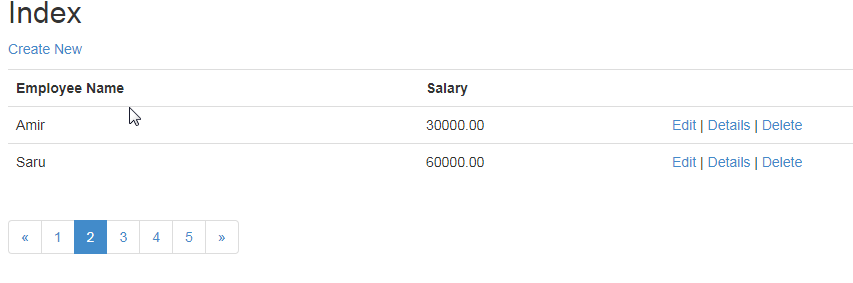
Step 31 : Run your project and output is shown below 


Happy Coding !!!

Sunday, 24 December 2017

Write a function named largestDifferenceOfEvens which returns the largest difference between even valued elements of its array argument. For example largestDifferenceOfEvens(new int[ ]{-2, 3, 4, 9}) returns 6 = (4 - (-2)). If there are fewer than 2 even numbers in the array, largestDifferenceOfEvens should return -1.

If you are programming in Java or C#, the function signature is
int largestDifferenceOfEvens(int[ ] a)

If you are programming in C or C++, the function signature is
int largestDifferenceOfEvens(int a[ ], int len) where len is the number of elements in the array a.

Examples

a is
then function returns
reason
{1, 3, 5, 9}
-1
because there are no even numbers
{1, 18, 5, 7, 33}
-1
because there is only one even number (18)
{[2, 2, 2, 2]}
0
because 2-2 == 0
{1, 2, 1, 2, 1, 4, 1, 6, 4}
4
because 6 - 2 == 4

   
public static int largestDifferenceOfEvens(int[] a)
        {
            int largestDiff = 0;

            int maxevent = 0, minevent = 0, eventcount = 0;
            
            for (int i = 0; i < a.Length; i++)
            {
                if (a[i] % 2 == 0)
                {
                    if (eventcount == 0)
                    {
                        maxevent = a[i];
                        minevent = a[i];
                    }
                    eventcount++;
                    if (a[i] > maxevent)
                    {
                        maxevent = a[i];
                    }
                    if (a[i] < minevent)
                    {
                        minevent = a[i];
                    }


                }
            }
            largestDiff = maxevent - minevent;

            if (eventcount < 2)
            {
                largestDiff = -1;
            }

            return largestDiff;


        }
Powered by Blogger.

Followers

Translate

Currency Converter

Exchange Rate

Featured post

Interpolation in angular 5

When we want to communicate from component class to template ,we can use interpolation which use the { { expression }} to render the bound...

Popular Posts

My Facebook Page